Pasiuna
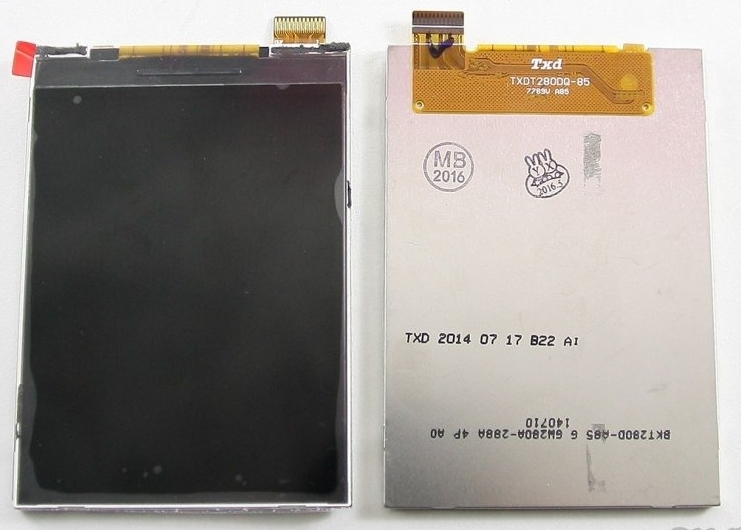
This manual provides essential information for the installation, care, and troubleshooting of your Alcatel One Touch 2012d smartphone display replacement. This product is a replacement LCD screen module designed specifically for the Alcatel One Touch 2012d model, intended to restore display functionality to your device.

Pag-setup ug Pag-instalar
Replacing a smartphone display requires technical skill and specialized tools. It is highly recommended that installation be performed by a qualified technician. Attempting installation without proper knowledge and tools may result in damage to the display or the smartphone, voiding any potential warranty.
Kinatibuk-ang mga Giya sa Pag-instalar (Girekomendar ang Propesyonal nga Pag-instalar):
- I-off ang Device: Ensure the smartphone is completely powered off before beginning any disassembly.
- Paglansad: Carefully disassemble the smartphone, following a service manual or reliable repair guide specific to the Alcatel One Touch 2012d. This typically involves removing the back cover, battery, and various screws and connectors.
- Disconnect Old Display: Gently disconnect the flex cables of the old display from the motherboard.
- Kuhaa ang Daang Display: Carefully remove the damaged display from the phone's frame. Heat may be required to loosen adhesive.
- Limpyo nga Frame: Thoroughly clean any old adhesive residue from the phone's frame.
- Test New Display (Pre-installation): Before fully adhering the new display, connect its flex cables to the motherboard and power on the phone to test its functionality (display, touch response, brightness). Do not remove protective films or adhesive covers until the display is fully tested and confirmed working.
- Pag-instalar og Bag-ong Display: If the test is successful, power off the phone, apply new adhesive to the frame, and carefully seat the new display.
- Reconnect and Reassemble: Reconnect all flex cables and reassemble the smartphone in reverse order of disassembly.
- Katapusan nga Pagsulay: Power on the device and perform a comprehensive test of all display and touch functions.
Caution: Static electricity can damage electronic components. Use anti-static precautions during installation.
Pagpalihok sa Display
Once correctly installed, the replacement display operates identically to the original display. All functions, including touch input, display brightness, and color reproduction, will be managed by the smartphone's operating system and hardware. No special operating procedures are required for the display itself.
Pagmentinar
Proper maintenance can extend the lifespan of your smartphone display.
- Paglimpyo: Paggamit og humok, walay lint nga microfiber nga panapton aron hinayhinay nga mapapas ang screen. Alang sa gahi nga mga lama, gamay dampen the cloth with distilled water or a screen-specific cleaning solution. Avoid harsh chemicals, abrasive materials, or excessive moisture.
- Proteksyon: Consider using a screen protector (tempered glass or film) to guard against scratches and minor impacts. A protective case for the smartphone can also help prevent damage from drops.
- Likayi ang Grabe nga mga Kondisyon: Do not expose the display to extreme temperatures, direct sunlight for prolonged periods, or high humidity.
- Pagdumala uban ang pag-amping: Avoid placing heavy objects on the screen or applying excessive pressure, which can cause internal damage.
Pag-troubleshoot
If you encounter issues after display replacement, consider the following common troubleshooting steps:
- Walay Display/Itom nga Screen:
- Ensure all flex cables are securely connected to the motherboard.
- Check for any visible damage to the flex cables or connectors.
- Verify the battery is charged and properly connected.
- Perform a hard reset of the phone (refer to your phone's original manual for instructions).
- Flickering Screen/Lines on Display:
- This often indicates a loose or damaged flex cable connection. Re-seat the display cables.
- Could also be a faulty display.
- Touchscreen Not Responding/Ghost Touches:
- Ensure the touch digitizer flex cable is properly connected.
- Clean the screen surface for any debris or moisture.
- I-restart ang telepono.
- If the issue persists, the digitizer may be faulty or damaged during installation.
- Incorrect Colors/Dim Display:
- Check display settings in the phone's operating system.
- Ensure the display flex cable is fully seated.
- Could indicate a faulty display panel.
Kon kini nga mga lakang dili makasulbad sa problema, ang propesyonal nga pagdayagnos ug pag-ayo mahimong gikinahanglan.
Mga detalye
| Feature | Espesipikasyon |
|---|---|
| Uri sa Produkto | Smartphone Display Replacement |
| Pagkaangay | Alcatel One Touch 2012d |
| Brand | Alcatel (for compatible device) |
| Modelo | One Touch 2012d (for compatible device) |
| Gibanabana. Timbang sa Pakete | 0.4 kg |
| Gibanabana. Mga Dimensyon sa Pakete (L x W x H) | 30 cm x 20 cm x 10 cm |
Note: Display-specific technical specifications (e.g., resolution, panel type) are not provided and typically match the original device's specifications.
Mga Tip sa Gumagamit
Samtang ang piho nga user reviews or Q&A content were not available for direct incorporation, here are some general tips for handling and using replacement smartphone displays:
- Pagdumala uban ang pag-amping: Replacement displays are fragile. Avoid bending flex cables sharply or applying pressure to the screen surface before or during installation.
- Pagsulay sa hingpit: Always perform a full functional test of the display and touch digitizer before permanently adhering the screen to the phone frame. This includes checking for dead pixels, touch sensitivity across the entire screen, and proper display of colors.
- Gamita ang hustong mga himan: Ensure you have the correct tools for smartphone disassembly and reassembly to prevent stripping screws or damaging components.
- Consult Resources: If performing a DIY installation, refer to detailed video tutorials or repair guides specific to the Alcatel One Touch 2012d model.
Garantiya ug Suporta
For specific warranty information regarding this replacement display, please refer to the terms provided by your seller at the time of purchase. General return and refund policies may apply as per the seller's terms.
For technical support or assistance with installation, it is recommended to contact a professional smartphone repair service. The seller, HotComputers Store, maintains a high positive feedback rating, indicating reliable service for their products.


