


Millenium MPS-450 E-Drum Module
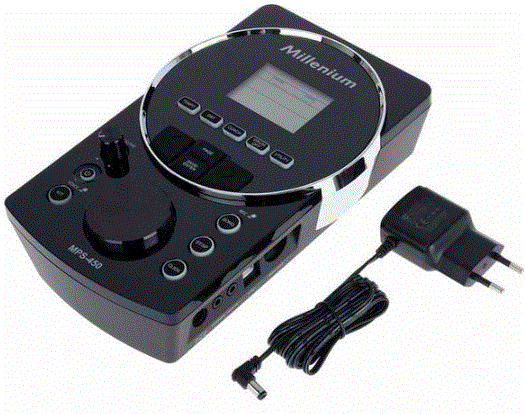
Impormasyon sa Produkto
Mga detalye
- Modelo: MPS-450
- Product Type: E-Drum Module
- Petsa sa Pagpagawas: 23.04.2025
- ID sa produkto: 461045 (V4)
- Bersyon sa Software: V1.2
Kinatibuk-ang impormasyon
- Kini nga dokumento adunay hinungdanon nga mga panudlo alang sa luwas nga operasyon sa produkto. Basaha ug sunda ang mga instruksyon sa kaluwasan ug ang tanan nga ubang mga instruksyon. Itago ang dokumento alang sa umaabot nga pakisayran. Siguruha nga kini magamit sa tanan nga naggamit sa produkto. Kung ibaligya nimo ang produkto sa lain nga tiggamit, siguroha nga nadawat usab nila kini nga dokumento.
- Ang among mga produkto ug dokumentasyon gipailalom sa usa ka proseso sa padayon nga pag-uswag. Busa sila mahimong mausab. Palihug tan-awa ang pinakabag-o nga bersyon sa dokumentasyon, nga andam na nga i-download sa ubos www.thomann.de.
Mga simbolo ug signal nga mga pulong
Niini nga seksyon makit-an nimo ang pagkahumanview sa kahulogan sa mga simbolo ug signal nga mga pulong nga gigamit niini nga dokumento.
| Signal nga pulong | Kahulugan |
| KUYAW! | Kini nga kombinasyon sa simbolo ug senyales nga pulong nagpaila sa usa ka diha-diha nga makuyaw nga sitwasyon nga moresulta sa kamatayon o seryoso nga kadaot kon kini dili malikayan. |
| WARNING! | Kini nga kombinasyon sa simbolo ug signal nga pulong nagpaila sa usa ka posible nga peligro nga sitwasyon nga mahimong moresulta sa kamatayon o grabe nga kadaot kung dili kini malikayan. |
| PAHIBALO! | Kini nga kombinasyon sa simbolo ug senyales nga pulong nagpaila sa usa ka posible nga peligro nga kahimtang nga mahimong moresulta sa materyal ug kadaot sa kinaiyahan kung dili kini malikayan. |
| Pasidaan mga timailhan | Matang sa peligro |
 |
Pasidaan – high-voltage. |
 |
Pasidaan – danger zone. |
Instruksyon sa kaluwasan
Gituyo nga paggamit
- Ang mga modyum nga drum gituyo aron magamit alang sa pagkabig sa digital signal signal gikan sa drum pads ngadto sa lainlaing tunog sa percussion. Gamita ra ang yunit sama sa gihulagway sa kini nga manwal. Ang bisan unsang uban nga paggamit o paggamit sa ilalum sa ubang mga kondisyon sa pag-operate giisip nga dili husto ug mahimong magresulta sa personal nga kadaot o kadaot sa propiedad. Wala’y kapangakohan nga igahatag alang sa mga danyos nga resulta sa dili husto nga paggamit.
- Kini nga himan mahimong gamiton lamang sa mga tawo nga adunay igo nga pisikal, sensoryal, ug intelektwal nga mga abilidad ug adunay katugbang nga kahibalo ug kasinatian. Mahimong gamiton sa ubang mga tawo kini nga aparato kung sila gibantayan o gitudloan sa usa ka tawo nga responsable sa ilang kaluwasan.
Kaluwasan
- KUYAW!
Risgo sa kadaot ug matuk-an nga peligro alang sa mga bata!
Ang mga bata mahimong maghuot sa materyal nga pagputos ug gagmay nga mga bahin. Ang mga bata mahimong makasamad sa ilang kaugalingon kung maggunit sa aparato. Ayaw tugoti ang mga bata nga magdula sa materyal nga pagputos ug sa aparato. Kanunay ibutang ang packaging nga materyal nga dili maabot sa mga masuso ug gagmay nga mga bata. Kanunay nga ilabay ang materyal sa pagputos sa hustong paagi kung wala kini gigamit. Ayaw tugoti ang mga bata sa paggamit sa device nga walay pagdumala. Ipahilayo ang gagmay nga mga piyesa gikan sa mga bata ug siguroa nga ang aparato wala mag-ula sa bisan unsang gagmay nga mga bahin (sama nga mga knobs) nga mahimo nga dulaan sa mga bata. - KUYAW!
Peligro sa kinabuhi tungod sa kuryente!
Sulod sa aparato adunay mga lugar diin ang taas nga voltages mahimong anaa. Ayaw pagtangtang sa bisan unsang mga tabon. Wala’y mga bahin nga magamit sa tiggamit sa sulod. Ayaw gamita ang himan kung ang mga tabon, kahimanan sa kaluwasan o optical nga mga sangkap nawala o nadaot. - WARNING!
Posibleng kadaot sa pandungog tungod sa taas nga volume sa mga headphone!
Ang paggamit sa mga headphone sa taas nga volume mahimong moresulta sa permanenteng pagkadaot sa pandungog. Sulod sa taas nga yugto sa panahon, bisan ang lebel nga ingon og dili kritikal mahimong hinungdan sa kadaot sa pandungog. Likayi ang paggamit sa mga headphone sa taas nga volume, ilabi na sa taas nga yugto sa panahon. - PAHIBALO!
Ang kadaot sa eksternal nga suplay sa kuryente tungod sa taas nga voltages!
Ang aparato gipadagan sa usa ka eksternal nga suplay sa kuryente. Ang eksternal nga suplay sa kuryente mahimong madaot kung kini gipadagan sa dili husto nga voltage o kung taas nga voltage peak mahitabo. Sa pinakagrabe nga kaso, sobra nga voltagmahimo usab nga hinungdan sa peligro sa kadaot ug sunog. Siguroha nga ang voltage espesipiko sa eksternal nga suplay sa kuryente motakdo sa lokal nga grid sa kuryente sa dili pa isaksak ang suplay sa kuryente. I-operate lamang ang eksternal nga suplay sa kuryente gikan sa propesyonal nga na-install nga mga mains socket nga giprotektahan sa nahabilin nga kasamtangan nga circuit breaker (FI). Siguruha nga ang plug sa kuryente dali nga ma-access sa tanan nga oras kung kini ra ang aparato nga luwas nga madiskonekta ang aparato gikan sa suplay sa mains. Isip usa ka pag-amping, idiskonekta ang suplay sa kuryente gikan sa grid sa kuryente kung nagsingabot ang mga bagyo o kung ang aparato dili magamit sa mas taas nga panahon. - PAHIBALO!
Ang kadaot sa aparato tungod sa paggamit sa dili angay nga mga suplay sa kuryente sa gawas!
Kung ang aparato gipadagan sa usa ka dili angay nga suplay sa kuryente sa gawas, ang aparato mahimong madaot pinaagi sa overvoltage o sayop nga polarity. Kung dili maayo ang mga butang, ang paggamit sa dili angay nga suplay sa kuryente mahimo usab nga hinungdan sa peligro sa kadaot ug sunog. Gamita lamang ang eksternal nga suplay sa kuryente nga gitudlo alang sa aparato o usa ka katumbas nga eksternal nga suplay sa kuryente nga adunay parehas nga mga parameter. Kung nagduhaduha, itandi ang voltage specifications sa external power supply ug ang polarity (+/-) uban sa specifications niini nga manwal ug giimprinta sa device. Voltage ug polarity kinahanglan kanunay nga magkatugma. - PAHIBALO!
Ang kadaot sa aparato kung gipaandar sa dili angay nga kahimtang sa palibot!
Ang aparato mahimong madaot kung kini gipadagan sa dili angay nga kahimtang sa palibot. Paandara lang ang device sa sulod sa sulod sa ambient nga kondisyon nga gitakda sa "Mga teknikal nga detalye" nga kapitulo niini nga manwal sa paggamit. Likayi ang pag-operate niini sa mga palibot nga adunay direktang kahayag sa adlaw, bug-at nga hugaw ug kusog nga mga vibrations. Likayi ang pag-operate niini sa mga palibot nga adunay kusog nga pag-usab-usab sa temperatura. Kung ang pag-usab-usab sa temperatura dili malikayan (alang sa examppagkahuman sa pagdala sa ubos nga temperatura sa gawas), ayaw dayon i-on ang aparato. Ayaw ipaubos ang aparato sa mga likido o kaumog. Ayaw gayud ibalhin ang device ngadto sa laing lokasyon samtang kini naglihok. Sa mga palibot nga adunay pagtaas sa lebel sa hugaw (alang sa examptungod sa abog, aso, nikotina o gabon): Ipalimpyo ang aparato sa mga kwalipikado nga mga espesyalista sa regular nga mga agwat aron malikayan ang kadaot tungod sa sobra nga kainit ug uban pang mga malfunction.
Mga bahin
- 418 ka tingog
- 30 pre-programmed drum kits
- 10 user kit
- 80 pre-programmed songs
- 5 ka kanta sa tiggamit
- 128 MIDI nga tingog
- Metronome
- Coach mode with various exercise types
- Connections for headphones, AUX, USB and MIDI
- Power adapter and retaining plate (included)
- Operating nga sistema: Windows® 8 ug sa ulahi, Mac OS X® 10.8 ug sa ulahi
Pag-instalar
- Unpack ug susiha pag-ayo nga walay kadaot sa transportasyon sa dili pa gamiton ang yunit. Hupti ang pagputos sa kagamitan. Aron hingpit nga mapanalipdan ang produkto batok sa pagkurog, abug ug kaumog sa panahon sa transportasyon o pagtipig gamita ang orihinal nga pakete o ang imong kaugalingon nga materyal sa pagputos nga angay alang sa transportasyon o pagtipig, matag usa.
- Paghimo sa tanan nga mga koneksyon samtang ang aparato wala. Gamita ang pinakamubo nga posible nga taas nga kalidad nga mga kable para sa tanan nga koneksyon. Pag-amping sa pagpadagan sa mga kable aron malikayan ang mga peligro nga matumba.
Pag-setup, pagkonektar sa mga pad ug mga pedal
- Ang pag-setup ug pag-assemble sa mga pad ug pedal gihulagway sa detalye sa gilakip nga mga panudlo sa asembliya.
- Susiha nga ang tanan nga nagkonektar nga mga kable tali sa mga pad ug sa drum module husto nga konektado.
Pagkonektar sa suplay sa kuryente
- Connect the included power adapter to the power supply socket on the device.
- I-plug ang mains plug sa socket.
Pagkonektar sa mga headphone
Ikonektar ang imong stereo headphone sa [PHONES] output sa drum module.
Pagkonektar sa mga audio device
- Ikonektar ang mga input sa imong amplifier o aktibong monitor sa [OUTPUT] nga mga socket sa drum module.
- If you are using a mono amplifier, ikonektar ang input niini sa [L/MONO] output socket sa drum module.
Pagkonektar sa usa ka CD o MP3 player
Ikonektar ang usa ka CD o MP3 player sa [AUX IN] input socket sa drum module.
Pagkonektar sa mga aparato sa MIDI
- Ikonektar ang gawas nga MIDI device o ang imong kompyuter sa [USB] port sa drum module.
- Use a current operating system still supported by the provider to avoid tech‐nical difficulties.
Mga koneksyon ug kontrol
atubangan nga panel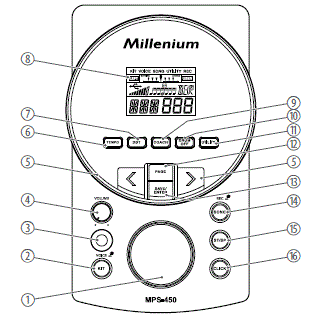
| 1 | Jog wheel for selecting a drum kit and setting values quickly |
| 2 | [Kit/VOICE] | Button for opening the ‘KIT’ ug ‘VOICE’ mga menu
Short press: opens the ‘KIT’ menu. Press and hold: opens the menu. ‘VOICE’ . |
| 3 | [GAHOM] | Panguna nga switch. I-on ug i-off ang device. |
| 4 | [VOLUME] | VOLUME control for the headphone output of the device |
| 5 | [<] / [>] | Selects an option or sets a value |
| 6 | [TEMPO] | Adjusts the metronome and playback speed |
| 7 | [DBT] | Enables the double bass trigger |
| 8 | Pagpakita |
| 9 | [COACH] | Opens coach mode with practice sets. |
| 10 | [DRUM OFF] | Mutes the drum track of a piece of music |
| 11 | [KAMUSANAN] | Opens the ‘UTILITY’ menu for changing device settings |
| 12 | [PANID] | Toggles between the settings of different functions |
| 13 | [SAVE/ENTER] | Confirms or saves drum kit settings |
| 14 | [SONG/REC] | Button for opening the ‘SONG’ menu and recording mode
Short press: opens the ‘SONG’ menu. Press and hold: starts the recording mode. |
| 15 | [ST/SP] | Starts or stops the playback of songs |
| 16 | [I-klik] | Switches the metronome on and off |
likod nga panel
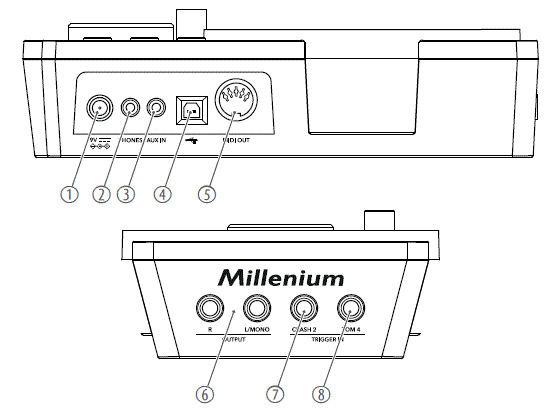
| 1 | [9V] | Connection socket for the plug-in power supply for power supply |
| 2 | [MGA TELEPONO] | Connection socket for headphones |
| 3 | [AUX IN] | Input for external audio devices such as MP3 or CD players |
| 4 | [USB MIDI] | Connection socket for an external MIDI device with a USB interface |
| 5 | [MIDI GAWAS] | Connecting socket for an external MIDI device |
| 6 | [OUTPUT R | L / MONO] | Output for external audio devices |
| 7 | [TRIGGER IN – CRASH2] | Connection socket for crash 2 |
| 8 | [TRIGGER IN – TOM 4] | Connection socket for tom 4 |
Pagpakita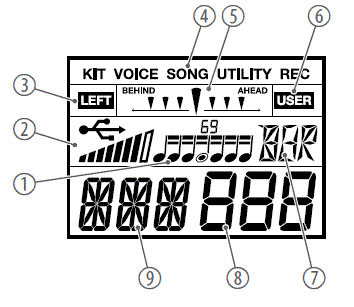
| 1 | Coach mode: Displays the rhythm type |
| 2 | Displays the connected external device and the current touch velocity |
| 3 | Displays the current mode of a sublevel |
| 4 | Displays the current mode, e.g. ‘KIT’ , ‘VOICE’ , ‘SONG’ , ‘UTILITY’ ug uban pa. |
| 5 | Coach mode: Displays the deviation from the beat |
| 6 | Displays the current mode of a sublevel |
| 8 | Displays the value associated with the selected parameter, or the number of the song, voice, or drum kit |
| 7 | Displays the name of the selected pad |
| 9 | Displays the currently selected parameter, e.g. volume, trigger curve, etc. |
Naglihok
Mga gimbuhaton
Pag-on ug off
- Check all cable connections for correct seat before turning on.
- Before switching the device on, turn the [VOLUME] control to minimum.
- Use the [POWER] main switch to turn the drum module on or off. The current device settings are retained when switching off.
Awtomatikong pagpalong
- When the device is not used it automatically shuts off after 30 minutes.
- Use the Utility menu ( Ä Chapter 6.12 ‘Utility menu’ on page 22) to disable automatic shutoff.
Pag-adjust sa volume
To adjust the volume, hit a pad while slowly turning the [VOLUME] control clockwise.
I-reset sa mga default sa pabrika
- To reset the entire drum module to factory settings, turn it off first.
- Hold down [<] and [>] simultaneously and additionally press [POWER] until the display shows ‘FAC SET…’ .
Selecting and adjusting drum kits
- A drum kit is a compilation in which a certain sound (voice) and several sound parameters are assigned to each pad. Selecting different drum kits lets you customise the sound of your drum kit in seconds to the desired music genre. Besides the 30 pre-programmed drum kits you can also create, customise and save 10 user drum kits.
- Ang listahan sa drum kit anaa alang sa pag-download sa panid sa produkto sa www.thomann.de.
Pagpili sa usa ka drum kit
To select a specific drum kit, proceed as follows:
- Press [KIT/VOICE].
- The current kit name and kit number are displayed.
- Use the arrow buttons ([<] / [>]) or the jog wheel to select the desired kit. The setting is automatically stored.
Pag-assign og tingog
Ang lista sa tingog kay ma-download sa panid sa produkto sa www.thomann.de.
To programme a specific voice for a pad, proceed as follows:
- Hold down [KIT/VOICE] for about 2 seconds.
- The current Voice name and Voice number are displayed.
- Strike the pad whose voice you want to change.
- The name of the current pad is displayed.
- Use the arrow buttons ([<] / [>]) or the jog wheel to select the desired voice. The setting is automatically stored.
Nagpatugtog sa drum kit
- Ang lifespan sa mesh nga panit sa ulo sa bass drum pad gipalugwayan pinaagi sa paggamit sa itom nga plastik nga kilid sa bass drum beater. Kung gigamit ang gibati nga kilid bisan pa, ang abrasion ug usa ka posible nga paggisi sa panit sa ulo sa mata labi nga gipadali.
- Ang bass drum beater mahimong ma-turn 180 degrees pinaagi sa pagtangtang sa locking screw.
Sama sa usa ka acoustic drum kit, ang mga pad motubag sa lainlaing mga teknik sa pagdula ug dinamika. Ang tanan nga mga pad sensitibo sa tulin. Ang ubang mga tingog nag-ilis sa ilang timbre depende sa suntok nga gigamit.
- Mga tambol
With the snare drum we distinguish between head and rimshot.- Ulo
Strike the head only. - Rimshot
Simultaneously strike the head and the rim or only the rim of the pad.
- Ulo
- Mga simbal
We distinguish the following cymbal zones:- pana
Play in the area between the edge and the bell of the cymbal. - Gituok
Choke play is possible with crash and ride cymbals but not with the hi-hat. To do so, stop the sound of the crash and ride cymbals with the hand at the edge of the cymbal immediately after hitting it.
- pana
- Hi–kalo
With the hi-hat we distinguish between hi-hat pedal change, open hi-hat, closed hi-hat, hi-hat pedal and splash.- Hi-hat pedal change
When the pedal is pressed in different positions, the voice changes when the hi-hat pad is hit (similar to an acoustic drum kit). - Ablihi ang hi-hat
Strike the hi-hat pad without pressing the pedal. - Sirado nga hi-hat
Strike the hi-hat pad with fully pressed pedal. - Hi-hat nga pedal
Press the hi-hat controller pedal to generate a closed sound without striking the hi-hat pad. - Pagsabwag
Play the hi-hat with fully pressed pedal and then open it suddenly.
- Hi-hat pedal change
Modifying drum kits
Pag-customize sa usa ka drum kit
Drum kits 1 … 30 are preset. You can change the preset kits and save them as user kits 31 … 40.
- Press [KIT/VOICE].
- The Kit menu is displayed.
- Press [PAGE] repeatedly until the required ‘KIT NAME’ or ‘VOLUME’ submenu is displayed.
- Use the arrow buttons ([<] / [>]) or the jog wheel to change the parameter value.
| Parameter | Pagpakita | Kahulugan | Bili range |
| KIT NGALAN | NUM XXX | Pagpili sa drum kit |
|
| TOMO | VOL XXX | Volume of the pads of the drum kit | 0 … 127 |
Tomo
Changing the volume of a particular drum kit affects all pads.
Pag-customize sa mga parameter sa tingog
Ang mga parameter sa tingog kanunay nga nalangkit sa usa ka pad. Kay example, kung usbon nimo ang volume sa snare drum, ang ubang mga pad dili maapektuhan.
- Hold down [KIT/VOICE] for about 2 seconds.
- The current Voice name and Voice number are displayed.
- Strike the pad whose voice you want to change.
- The name of the current pad is displayed.
- Press [PAGE] repeatedly until the required ‘VOICE NAME’ or ‘VOLUME’ sub‐menu is displayed.
- Use the arrow buttons ([<] / [>]) or the jog wheel to change the parameter value.
| Parameter | Pagpakita | Kahulugan | Bili range |
| TIGGER | KIK, Sn, SnR, T1, T2, T3, T4, HH, C1, C2, Rd, Pd, PS | Trigger |
|
| VOICE NAME | NUM XXX | Voice assigned to the trigger | 1 … 408 |
| TOMO | VOL XXX | Tomo | 0…127 |
Saving user kits
Ang kasamtangan nga preset kits mahimong gamiton isip basehan sa user kits. Ang mga user kits mahimo unya nga tipigan sa memorya sa device.
- To save changes in the drum kit or voice menu, press [SAVE/ENTER].
- Use the arrow buttons ([<] / [>]) or the jog wheel to select a user kit in which you want to save the changed settings (display shows 31 … 40).
- The user kit number flashes.
- Press [SAVE/ENTER].
- The display shows ‘OK’ . The changes are saved.
Playing, customising and accompanying songs
Pagpili og kanta
- Your digital drum module provides 80 pre-programmed songs. You can play the songs and accompany them on the drum module. A song contains a drum part (con‐taining the rhythm in which you play the pads) and an accompaniment part (percus‐sion and melody). The volume of both parts can be adjusted separately.
- Ang lista sa kanta magamit aron ma-download sa panid sa produkto sa www.thomann.de.
- Press [SONG].
- The name and number of the current song appear in the display.
- Press [PAGE] repeatedly until the required ‘SONG SELECT’ , ‘ACC VOLUME’ or ‘ DRUM VOLUME’ submenu is displayed.
- Use the arrow buttons ([<] / [>]) or the jog wheel to change the parameter value.
- Press [START/STOP] to play and stop the songs.
| Parameter | Pagpakita | Kahulugan | Bili range |
| PAGPILI SA AWIT | NUM XXX | Number of the song. | 1 … 85 |
| ACC VOLUME | ACC XXX | Ang gidaghanon sa pag-uban | 0 … 8 |
| DRUM VOLUME | DRM XXX | Drum kit volume | 0 … 8 |
Pag-muting sa drum track
You can mute the drum track of the pre-programmed songs.
- Press [DRUM OFF] to mute the drum track.
- The indicator LED of the button lights.
- Press [DRUM OFF] again to unmute the drum track.
Ang function sa metronom
Press [CLICK] to turn the Metronome on and off again. While the metronome is on, the indicator LED of the button is flashing.
Mga setting
- Press [PAGE] repeatedly until the required ‘TIME SIGNATURE’ , ‘INTERVAL’ , ‘VOLUME’ or ‘NAME’ submenu is displayed.
- Use the arrow buttons ([<] / [>]) or the jog wheel to change the parameter value.
| Parameter | Pagpakita | Kahulugan | Bili range |
| TIME SIG‐ NATURE | SIG XXX | Pagpasiugda sa mga beats |
|
| INTERVAL | INT XXX | Mga beat kada sukod |
|
| TOMO | VOL XXX | I-klik volume | 0 … 5 |
| NGALAN | NUM XXX | Name and number of the cor‐ responding click voice | 1 … 6 |
Mga gimbuhaton sa pagrekord
This feature allows you to use the drum module for recording. You can record your own drum track with or without an accompanying song. The recording can be stored as a MIDI file in 5 user songs directly in the drum module.
Pagpangandam sa pagrekord
- Hold down [SONG/REC] for 2 seconds.
- The indicator LED of the button flashes.
- Use the arrow buttons ([<] / [>]) or the jog wheel to select the user song (dis‐play shows ‘81’ … ‘85’ ) in which the recording is to be stored.
- Press [ST/SP].
- The display shows ‘RDY’ . The device is now record-enabled.
Pagsugod ug paghunong sa pagrekord
- When the device is ready to record (the display shows ‘RDY’ ), press [ST/SP] or hit a pad.
- The recording starts after 4 beats. The display shows ‘ING’ .
- To stop recording, press [ST/SP].
- The indicator LED of the button goes out.
- Press [ST/SP] to play the recorded song.
- When the recording capacity is exhausted, the display shows ‘REC FUL’ . The recording then stops automatically.
- The metronome is switched off by default during recording. Press [CLICK] to turn the metronome on or off.
Coach mode
Starting coach mode
Coach mode is a practice set. It consists of three different exercise types and a switch‐able display that monitors whether you keep the beat.
- Press [COACH] to start coach mode.
- Press [PAGE] repeatedly until the required ‘Quiet Count’ , ‘Change Up’ , ‘Beat Check’ or ‘Measure Hint’ submenu is displayed.
- Press [SAVE/ENTER] to start the exercise type.
- Press [PAGE] to set additional parameters in the submenus.
- Press [TEMPO] to change the pace of the exercise at any time.
- Press [COACH] to exit coach mode.
| Pag-ehersisyo tipo | Pagpakita | Deskripsyon |
| Hilum nga Ihap | QUT CNt | This exercise develops the sense for pace. There are 3 different silent modes and 5 selectable rhythm modes. |
| Usba Up | CHG UP | This exercise trains the timing accuracy. There are 3 different types of rhythm, the change occurs every two bars. |
| Pagdaug Check | BEA CHE | This exercise trains the precision. There are 13 selectable rhythm types. |
| Measure Hint | MEA | Displays the deviation from the beat. |
QUIET COUNT coach mode
The ‘Quiet Count’ exercise type develops the sense of pace.
- Press [COACH] to start coach mode.
- Press [PAGE] repeatedly until the required ‘Quiet Count’ submenu is displayed.
- Press [SAVE/ENTER] to start the exercise type.
- Press [PAGE] to toggle between the parameters [QUT] and [CNT].
- Use the arrow buttons ([<] / [>]) or the jog wheel to change the parameter value.
- Press [ST/SP] to start the exercise. The exercise start after one bar.
- Press [ST/SP] again to stop the exercise.
| Parameter | Pagpakita | Deskripsyon | Bili range |
| QUT | QUT XXX | Gamita ang mga buton sa pana ([<] / [>]) or the jog wheel to select a suitable silent mode. | 1 … 5 |
| CNT | CNT XXX | Gamita ang mga buton sa pana ([<] / [>]) or the jog wheel to select a suit‐ able counting mode.
|
1-1, 2-2, 1-3 |
CHANGE UP coach mode
The ‘Change Up’ exercise type trains the timing accuracy. A rhythm change will occurs every two bars. Starting from semitones, the note values gradually become shorter and then return to semitones. A flashing note symbol on the display indicates the upcoming rhythm change.
- Press [COACH] to start coach mode.
- Press [PAGE] repeatedly until the required ‘Change Up’ submenu is displayed.
- Press [SAVE/ENTER] to start the exercise type.
- Use the arrow buttons ([<] / [>]) or the jog wheel to select the desired rhythm type.
- Press [PAGE] and use the arrow buttons ([<] / [>]) or the jog wheel to toggle the display of the practice success ( ‘ON’ ) or ( ‘OFF’ ). The default setting for showing the practice success is ‘OFF’ .
- Press [ST/SP] to start the exercise. The exercise start after one bar. An automatic rhythm change will occurs every two bars.
- If the practice success display is on, the exercise stops automatically after a few passes and your score is displayed.
- Press [ST/SP] to stop the exercise.
| Parameter | Pagpakita | Deskripsyon | Bili range |
| CHG | CHG XXX | Gamita ang mga buton sa pana ([<] / [>]) or the jog wheel to select an appropriate rhythm type. | 1 … 3 |
| SCO | SCO XXX |
|
ON OFF |
BEAT CHECK coach mode
The ‘Beat Check’ exercise type trains precision with metronome assistance. If the dis‐play of the practice success is activated, the score will be displayed at the end of the exercise.
- Press [COACH] to start coach mode.
- Press [PAGE] repeatedly until the required ‘Beat Check’ submenu is displayed.
- Press [SAVE/ENTER] to start the exercise type.
- Use the arrow buttons ([<] / [>]) or the jog wheel to select one of 13 rhythm types.
- Press [PAGE] and use the arrow buttons ([<] / [>]) or the jog wheel to toggle the display of the practice success ( ‘ON’ ) or ( ‘OFF’ ). The default setting for showing the practice success is ‘OFF’ .
- Press [ST/SP] to start the exercise. The exercise start after one bar.
- If the practice success display is on, the exercise stops automatically after a few passes and your score is displayed.
- Press [ST/SP] to stop the exercise.
| Parameter | Pagpakita | Deskripsyon | Bili range |
| BEA | BEA XXX | Gamita ang mga buton sa pana ([<] / [>]) or the jog wheel to select an appropriate rhythm type. | 1 … 13 |
| SCO | SCO XXX |
|
ON OFF |
Double bass trigger
With the Double Bass Trigger (DBT) even beginners can master the double bass tech‐nique. With DBT assistance, one pedal stroke of the bass drum produces two or three continuous kick sounds.
Mga setting
- Press [DBT] to activate the double bass trigger.
- The indicator LED of the button lights. The display shows ‘DBT 1-x’ .
- Use the arrow buttons ([<] / [>]) or the jog wheel to change the trigger time for the second trigger. The selected setting is retained after switching off.
- Press [DBT] again to deactivate the double bass trigger.
| Param‐ eter | Pagpakita | Deskripsyon | Bili range |
| DBT | DBT XXX | Gamita ang mga buton sa pana ([<] / [>]) or the jog wheel to select a suitable trigger type.
|
1-1, 1-2, 1-3, 1-4 |
Tempo
You can use [TEMPO] to adjust the speed of the metronome or the accompanying music.
- Press [TEMPO].
- Use the arrow buttons ([<] / [>]) or the jog wheel to set the desired pace.
Mga setting sa pag-trigger
Pag-adjust sa mga setting sa trigger
The touch responsiveness can be adjusted to your needs and preferences by the set‐tings of this menu.
- Press [UTILITY].
- The display shows the Utility menu.
- Press [PAGE] repeatedly until the required submenu appears.
- Strike the pad whose parameter you want to modify.
- Gamita ang arrow buttons ([<] / [>]) o ang jog wheel aron usbon ang parameter value. Palihug timan-i ang impormasyon sa lamesa sa ubos.
| Parameter | Pagpakita | Kahulugan | Bili range |
| SENSI‐ TIVITY | SEN XXX | Volume nga kinaiya sa usa ka pad walay sapayan sa aktuwal nga strike intensity. Kon mas taas ang bili, mas taas ang volume kon magdula, ug vice versa. | 1…16 |
| XTALK | XTK XXX | If several pads are mounted on a rack vibrations can be transmitted to other pads when you hit a trigger and unintentionally trigger sounds. This crosstalk can be avoided by the appropriate setting. The value should be set as low as possible. | 1…8 |
| KURBA | CUR XXX |
|
1…6 |
| Parameter | Pagpakita | Kahulugan | Bili range |
| RETRIG CANCEL | RTG XXX | We call it ‘double trigger’ when multiple sounds are successively produced when playing a pad. This effect can be caused, among other things, by irregular waveforms, specifically in the decaying of the trigger. With this parameter, these distortions can be suppressed. The higher the value is, the higher the likelihood that rapidly successive strikes – such as in a drum roll – are no longer detected. So the value should be set as low as possible. | 1…16 |
| MIDI NOTA | MID XXX | Gi-assign nga MIDI note | 0…127 |
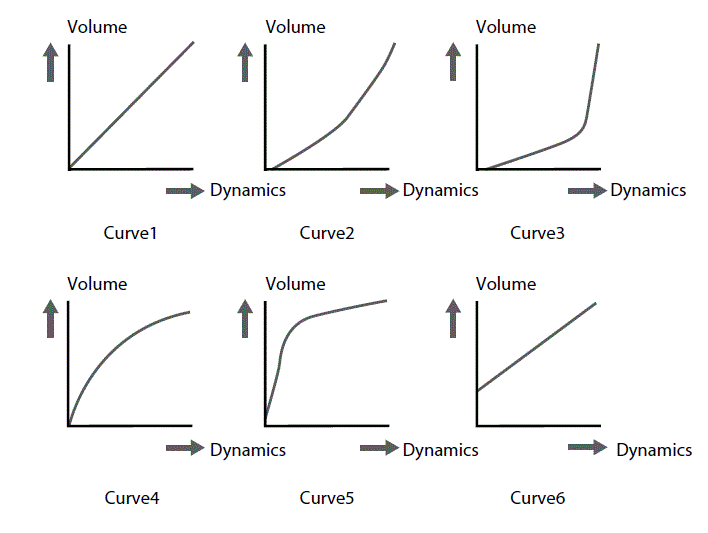
Utility nga menu
Pag-adjust sa mga setting sa device
In this menu, you can change various settings of the device.
- Press [UTILITY].
- The display shows the Utility menu.
- Press [PAGE] repeatedly until the required submenu appears.
- Use the arrow buttons ([<] / [>]) or the jog wheel to change the parameter value.
| Param‐ eter | Pagpakita | Kahulugan | Sakup sa kantidad |
| GM MODE | GM XXX | Defines the processing of programme change commands: ON: Programme change commands for MIDI channel 10 are processed as selection (GM kit). OFF: Programme change commands for MIDI channel 10 are processed as selection (local kit). |
ON OFF |
| GAHUM SA AUTO | POW XXX | Gihubit ang kinaiya sa awtomatikong pagsira:
|
30, 60, OFF |
Mga mensahe sa kahimtang
| Status mensahe | Kahulugan |
| REC FUL | The storage capacity for the recording is exhausted. |
| FAC SEt | The factory reset is complete. |
| EMP | The user song list is empty. |
| OK | The device settings and drum kit settings have been saved. |
| WAT | Data is loaded from the flash ROM, please wait. |
Pagpatuman sa MIDI
| Kalihokan | Gipasa | Giila | Mga komento | |
| Panguna nga agianan | Default | Kapitulo 10 | 1-16 | |
| Nausab | Dili | Dili | ||
| Mode | Default | Dili | Dili | |
| Mga mensahe | Dili | Dili | ||
| Giusab | ******** | ******** | ||
| Timan-i nga numero | 0…127 | 0…127 | ||
| Tinuod nga tingog | ******** | 0…127 | ||
| Katulin | Hinumdomi SA | Yes (99H, V=1…127) | 0…127 | |
| Hinumdomi nga NAPUWAS | Yes (99H, V=0) | 0…127 | ||
| Aftertouch | Mga yawe | Dili | Dili | |
| Mga kanal | Dili | Dili | ||
| Pitch bender | Dili | Oo | ||
| Pagpugong sa pagbag-o | 0 | Dili | Oo | Pagpili sa bangko |
| 1 | Dili | Oo | Modulasyon | |
| 5 | Dili | Oo | Oras sa Portamento | |
| 6 | Dili | Oo | Pagsulod sa datos | |
| 7 | Dili | Oo | Tomo | |
| 10 | Dili | Oo | Pan | |
| 11 | Dili | Oo | Pagpahayag | |
| 64 | Dili | Oo | Padayon nga pedal | |
| 65 | Dili | Oo | Portamento ON / OFF | |
| 66 | Dili | Oo | Sostenuto nga pedal | |
| 67 | Dili | Oo | Humok nga pedal | |
| 80 | Dili | Oo | Programa nga Reverb | |
| 81 | Dili | Oo | Koro nga programa | |
| 91 | Dili | Oo | Lebel sa Reverb | |
| 93 | Dili | Oo | Antas sa koro | |
| 120 | Dili | Oo | Natapos na ang Tanan nga Tunog | |
| 121 | Dili | Oo | I-reset ang Tanang Controller | |
| 123 | Dili | Oo | Natapos ang Tanan nga mga Sulat | |
| Pagbag-o sa programa | Oo | Oo | ||
| Eksklusibo sa sistema | Dili | Oo | ||
| Komon nga sistema | Posisyon sa Kanta | Dili | Dili | |
| Pagpili sa Kanta | Dili | Dili | ||
| Tune | Dili | Dili | ||
| Kalihokan | Gipasa | Giila | Mga komento | |
| Sistema sa tinuod nga oras | Relo | Oo | Dili | SUGOD ug STOP lang |
| Sugo | Oo | Dili | ||
| Mga mensahe sa aux | Lokal nga ON / OFF | Dili | Dili | |
| Natapos ang Tanan nga mga Tala | Dili | Dili | ||
| Aktibo nga Pangisip | Oo | Dili | ||
| Pag-reset sa sistema | Dili | Dili | ||
Teknikal nga mga detalye
| Mga koneksyon sa input | suplay sa kuryente | Hollow plug socket para sa power adapter |
| USB port | USB type B (MIDI) | |
| Trigger | 2 × 6.35 mm mono jack socket | |
| AUX sa | 1 × 3.5 mm stereo jack socket | |
| Mga koneksyon sa output | Linya sa gawas (R/L mono) | 2 × 6.35 mm nga jack socket |
| Mga headphone | 1 × 3.5 mm stereo jack socket | |
| MIDI | DIN panel socket, 5-pin | |
| Timbres | 418 | |
| Mga kit sa drum | 30 preset kits, 10 user kits | |
| Demo and practise songs | 80 nga pre-programmed nga kanta, 5 user nga kanta | |
| MIDI nga tingog | 128 (Ang mga lista sa MIDI magamit alang sa pag-download sa panid sa produkto sa www.thomann.de.) | |
| suplay sa kuryente | External power adapter, 100 – 240 V 50/60 Hz | |
| Ang operating voltage/kasamtangan | 9 V / min. 500 mA, polarity: Centre positive | |
| Operating nga sistema | Windows® 8 ug sa ulahi, Mac OS X® 10.8 ug sa ulahi | |
| Mga Dimensyon (W × H × D) | 125 mm × 95 mm × 187.5 mm | |
| Timbang | 0.5 kg | |
| Mga kahimtang sa palibot | Sakup sa temperatura | 0 °C…40 °C |
| Relatibong humidity | 20%…80% (dili pag-condensing) | |
Dugang impormasyon
| Gilakip ang racks | Oo |
| Upod sa lingkuranan | Dili |
| Naapil ang bass drum pedal | Oo |
| Kauban ang mga headphone | Dili |
| Mesh nga mga pad sa ulo | Oo |
| Mga pad sa stereo | Oo |
| Gidaghan nga direkta nga output | 0 |
I-plug ug koneksyon nga assignment
Pasiuna
Kini nga kapitulo makatabang kanimo sa pagpili sa husto nga mga kable ug mga plug aron makonektar ang imong bililhon nga kagamitan sa paagi nga masiguro ang usa ka hingpit nga kasinatian sa tunog. Palihug timan-i kini nga mga tambag, tungod kay labi na sa 'Sound & Light' nga pag-amping gipakita: Bisan kung ang usa ka plug mohaum sa socket, ang dili husto nga koneksyon mahimong moresulta sa pagkaguba sa kuryente amp, usa ka mubo nga sirkito o 'lang' sa dili maayo nga kalidad sa transmission!
Balanse ug dili balanse nga transmission
Unbalanced transmission is mainly used in semi-professional environment and in hifi use. Instrument cables with two conductors (one core plus shielding) are typical representatives of the unbalanced transmission. One conductor is ground and shielding while the signal is transmitted through the core. Unbalanced transmission is susceptible to electromagnetic interference, especially at low levels, such as microphone signals and when using long cables. In a professional environment, therefore, the balanced transmission is preferred, because this enables an undisturbed transmission of signals over long distances. In addition to the conductors ‘Ground’ and ‘Signal’, in a balanced transmission a second core is added. This also transfers the signal, but phase-shifted by 180°.
Tungod kay ang interference makaapekto sa duha ka mga cores parehas, pinaagi sa pagkubkob sa phase-shifted signal, ang interfering signal hingpit nga neutralized. Ang resulta usa ka lunsay nga signal nga wala’y bisan unsang pagpanghilabot sa kasaba.
TS phone plug (mono, dili balanse)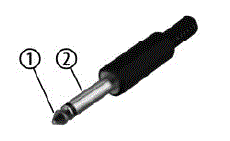
- Signal
- Yuta, panagang
Tulo ka poste 1/8″ mini nga jack sa telepono (stereo, dili balanse)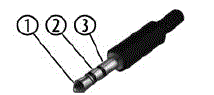
- Signal (wala)
- Signal (tuo)
- Yuta, panagang
Paglimpyo
Mga bahin sa aparato
Limpyohi kanunay ang accessible nga mga bahin sa device. Ang kasubsob sa pagpanglimpyo nagdepende sa operating environment: ang basa, aso o ilabinang hugaw nga palibot mahimong hinungdan sa mas taas nga akumulasyon sa hugaw sa mga component sa device.
- Paggamit ug uga nga humok nga panapton alang sa paglimpyo.
- Kuhaa ang gahi nga mga lama nga adunay gamay nga damp panapton.
- Ayaw gyud paggamit mga maglilinis nga adunay sulud nga alkohol o mas nipis.
- Never put any vinyl items on the device, as vinyl can stick to the surface or lead to its discolouration.
Pagpanalipod sa kinaiyahan
Paglabay sa materyal nga pagputos
- Ang mga materyales nga mahigalaon sa kinaiyahan gipili alang sa pagputos. Kini nga mga materyales mahimong ipadala alang sa normal nga pag-recycle. Siguruha nga ang mga plastik nga bag, packaging, ug uban pa ilabay sa husto nga paagi.
- Ayaw ilabay kini nga mga materyales uban sa imong normal nga basura sa panimalay, apan siguroha nga kini kolektahon para sa pag-recycle. Palihug sunda ang mga instruksyon ug mga marka sa packaging.
- Tan-awa ang disposal note bahin sa dokumentasyon sa France.
 Paglabay sa imong daan nga device
- Kini nga produkto gipailalom sa European Waste Electrical and Electronic Equipment Directive (WEEE) ingon nga giusab.
- Ayaw ilabay ang imong daan nga aparato gamit ang imong naandan nga basura sa balay; sa baylo, ihatod kini para kontroladong paglabay sa usa ka aprobahan nga kompanya sa paglabay sa basura o pinaagi sa imong lokal nga pasilidad sa basura. Kung nagduhaduha, konsultaha ang imong lokal nga pasilidad sa pagdumala sa basura. Mahimo usab nimo nga ibalik ang aparato sa usa ka retailer kung motanyag sila nga ibalik ang aparato nga libre o kung obligado sila nga buhaton kini. Kung ilabay ang aparato, sunda ang mga lagda ug regulasyon nga magamit sa imong nasud. Mahimo usab nimo ibalik ang imong daan nga aparato sa Thomann GmbH nga wala’y bayad. Susiha ang kasamtangan nga mga kondisyon sa www.thomann.de.
- Ang saktong paglabay makapanalipod sa kinaiyahan ingon man sa kahimsog sa imong isigkatawo. Kini tungod kay ang husto nga pagdumala sa mga daan nga aparato nagsalikway sa mga potensyal nga negatibo nga epekto sa mga peligro nga mga butang, ug tungod kay kini nagtipig sa mga kapanguhaan pinaagi sa pag-recycle niini.
- Timan-i usab nga ang paglikay sa basura usa ka bililhon nga kontribusyon sa pagpanalipod sa kinaiyahan. Ang pag-ayo sa usa ka himan o pagpasa niini ngadto sa laing tiggamit usa ka ekolohikal nga bililhon nga alternatibo sa paglabay. Kay example, gamita ang classified ads sa Thomann GmbH.
- Kung ang imong daan nga aparato adunay personal nga datos, kuhaa ang mga datos sa dili pa kini ilabay.
Germany · www.thomann.de
FAQ
Q: Can the MPS-450 E-Drum Module be connected to other electronic drum pads?
A: Yes, the MPS-450 E-Drum Module can be connected to various electronic drum pads using digital trigger signals for enhanced percussion sound generation.
Mga Dokumento / Mga Kapanguhaan
 |
Millenium MPS-450 E-Drum Set [pdf] Manwal sa Gumagamit MPS-450 E-Drum Set, MPS-450, E-Drum Set, Set |